

How to plan one unit around several assessments
One unit can prepare students for several assessments. The key is giving each task a clear job. A starting check shows what students already know. A progress check helps you decide what to teach next. A final task lets students show what they have learned after teaching and practice.
You do not need three big tasks to make this work. A short conversation or a paragraph may be enough for a useful check. Start with the learning, choose the evidence you need and make room for feedback. Below, Lite and Planning Wizard have separate instructions. The existing History downloads show one main assessment and its teaching sequence.
Start with the learning, then choose the tasks
Read the selected curriculum and each saved assessment together. Check the subject, year level, curriculum source and version. Use the official wording in your plan. Then write a short note about what students must know and do. The tasks belong together when they contribute to a clear learning sequence, not simply because they share a subject name.
ACARA’s assessment guidance connects curriculum, teaching and assessment. For your unit, list the knowledge and skills each task needs. Read the marking guides as well as the task titles. Two essays can ask for quite different thinking. A task about explaining causes needs more than a lesson that lists events.
- What learning does each task check?
- What will students produce or demonstrate?
- Which skills can be taught and practised across the tasks?
- What extra knowledge does a particular task need?
- What does each marking guide ask students to show?
Keep every selected task visible. If two tasks need very different content, check whether one unit is still the clearest choice. You may need more teaching time or separate units. Adding another task does not create extra lessons in the timetable. Keep the planned learning realistic for your class and available time.
Give each assessment a clear purpose
A starting check finds the starting point
A starting check is often called diagnostic assessment. Use it to find out what students already know before new teaching. It might be a few questions, a short explanation or a quick practical demonstration. Students are not expected to have learned the whole new unit first. Use what you notice to choose the next teaching steps.
A progress check helps you adjust teaching
A progress check is often called formative assessment. Place it after students have had a chance to learn and practise the relevant skill. Read the work soon enough to use it. If students are not linking evidence to their ideas, model that link again and give them another short practice. The check earns its place when it changes what happens next.
A final task draws the learning together
A final task is often called summative assessment. Place it after the preparation it requires. Keep its time, word limit, resources and working conditions clear. If the task runs across several weeks, include its whole working period and checkpoints. Do not reduce a longer task to a single due date and lose the time students need to complete it.
Choose weeks that leave room to learn
Start with any dates that are already fixed. Count the real lessons available before each task. Include modelling, practice, feedback and any working time built into the assessment. Check school events and other class tasks. A six week unit with two lessons each week has twelve planned lessons before interruptions, not six large blocks of unlimited teaching time.
- Place starting checks before the new learning they are meant to explore.
- Place progress checks where there is time to respond to the results.
- Place final tasks after the knowledge and skills have been taught and practised.
- Keep every checkpoint for tasks that run over several weeks.
- Read across the calendar for crowded weeks and overlapping units.
Two assessments can share a week if the workload and purpose make sense. Keep both names and requirements in the plan. If the tasks cannot fit, change the unit length, selected tasks or assessment dates with your school’s requirements in mind. Do not silently drop a task or shorten its working period to make the dates fit.
Where units run at the same time, check whether that is intentional. They may be taught in separate lessons or support different learning. If the overlap creates too much work, change the dates before creating detailed lessons. The term planning guide helps you see one unit within the wider term.
Share the teaching without giving away the answers
Teach shared skills across the unit. Students might practise reading a source, explaining a connection and supporting a judgement in several lessons. ACARA’s sequencing guidance describes how learning builds in a logical order. Put foundations before more demanding applications. Keep enough subject knowledge around the skill so the practice has meaning.
Make the learning goal clear for students. AERO’s learning goals guidance explains the use of learning intentions and success criteria. In History, a goal might be to explain a change using evidence from sources. Students can then check whether their evidence supports the explanation, rather than only checking how much they have written.
Show an example, practise together and then ask students to try independently. AERO’s explicit teaching guidance explains how to introduce new learning through explanation and modelling. For a final assessment, use suitable practice material that builds the skill without handing students the response they will submit. Keep teacher model answers separate from student task sheets.
In Lite: choose a main task and other tasks
Use TeaCheese Lite when you want downloadable resources. Describe your topic and ask for a unit. Review the curriculum and classroom choices. In the unit settings, choose the main assessment the unit leads towards. Use Other tasks in this unit to include other suitable saved assessments, then choose a week for each.
The main task gives the unit its direction. The other selected tasks also need preparation and their own places in the plan. Read the assessment names and due weeks before confirming creation. Check that the chosen tasks fit the topic and curriculum. Do not add an unrelated task only to fill an empty week.
Lite uses weeks within the unit for this setup. Match them to your own school dates when planning your term. Review the completed unit and its assessment links before asking for lessons. Lite files stay in Your documents and do not automatically fill a Planning Wizard curriculum map or coverage report.
See two tasks selected in Lite
For a fresh example, we created a unit using two saved Year 10 History assessments in Lite on 20 October 2026. The home front task stays in unit Week 4. Why War Began is in unit Week 6 and also needs teaching about sources and later developments. The unit length is six weeks, with two 60 minute lessons each week. The assessment tasks keep their own 50 and 60 minute conditions.
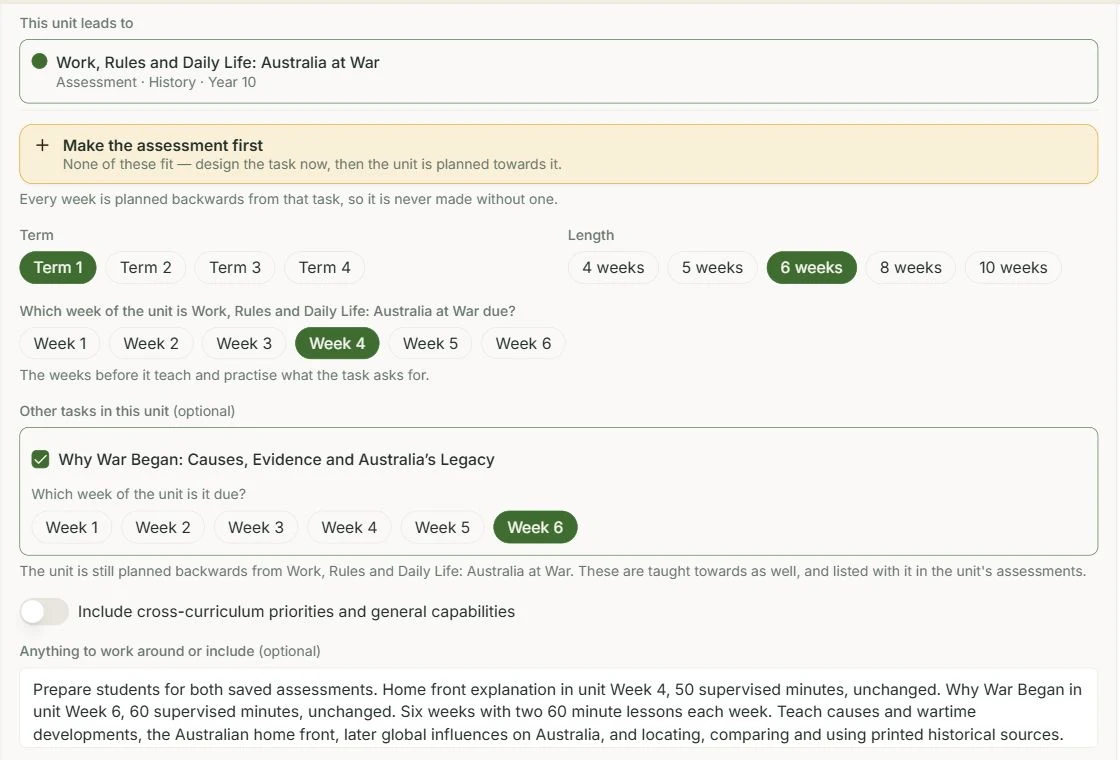
The generated unit is called War Abroad, Change at Home: Australia and the Second World War. Its preview shows twelve planned lessons and two linked assessments. The assessment list keeps the home front task in Week 4 for 50 minutes and Why War Began in Week 6 for 60 minutes. Open the task and guide beside the weekly teaching when reviewing your own unit.
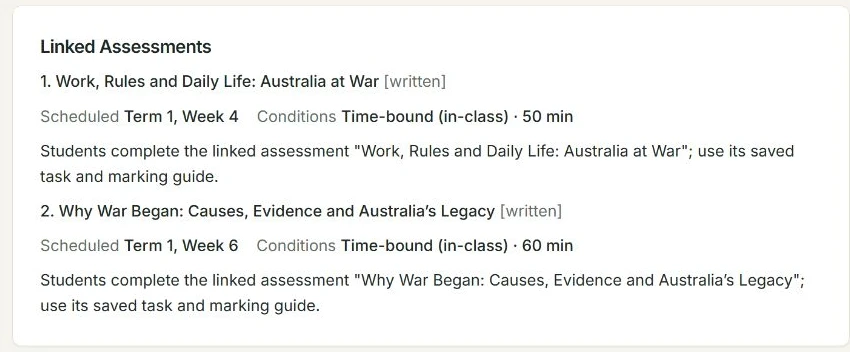
This is a separate setup from the four week History downloads below. It shows two formal assessments, not a requirement to create a starting check, progress check and final task in every unit. Those purposes help you choose what is useful for your own class.
In Planning Wizard: select tasks from the term
Use the Planning Wizard when you want curriculum maps, marking guides, assessments, units and lessons connected in the planning workspace. Choose the year plan, curriculum map and term. In the unit settings, keep the compatible assessments you want the unit to prepare students for and untick any that do not belong.
Review each task’s purpose and scheduled week. Set the unit length and teaching weeks. If you use the AI recommendation, read the proposed changes before following it. Check which assessment dates would move and whether the unit would run alongside another unit. The advice should support your teaching decision, not replace checking the actual timetable.
After creating the unit, read how its weekly teaching prepares students for every chosen assessment. Save it into the plan, then build the lessons from that unit. Keep these connected planning records separate from the Lite example files below. Explore the unit planner for the wider workflow.
Use the History files to see the connections
The existing Year 10 History downloads show a four week Lite unit about World War II and the Australian home front. They contain one main saved assessment, its marking guide, eight planned lessons and two selected lesson examples. They do not demonstrate several formally linked assessments. Use them to see how an actual task shapes teaching, then apply the planning questions above to your own set of tasks.
The main task asks for an individual historical explanation of 400 to 500 words in 50 minutes in unit Week 4. The unit also uses a separate First World War writing exercise for practice. That exercise is not evidence of another assessment selected through the unit’s Other tasks control. Read the full History example and find the blank unit template.
Open the original History examples
These are the original Lite Word exports from 20 October 2026. They show one main assessment and its teaching sequence. No account or email is needed.
History unit plan
Four weeks with a final World War II task in Week 4. First World War practice appears earlier. Add your own detail to the shorter lesson descriptions.
Student assessment and marking guide
A World War II explanation with three sections, 400 to 500 words and 50 supervised minutes. Includes the A to E guide.
Teacher copy and marking guide
The original teacher copy includes the marking guide, 4Cs notes, curriculum links and model responses.
Lesson example on comparing sources
Lesson 2 names a photograph, employment table and recruitment poster. Prepare the actual sources and a worked example that uses two of them.
Lesson example on using feedback
Lesson 7 reviews earlier First World War writing, then revisits World War II knowledge. Prepare the passages, retrieval questions and answers.
Keep your class and resources in view
Use the same classroom limits across the tasks and lessons. If students have no devices, check that research and source work can happen with the materials you provide. Plan the printed sources, equipment and reading support early. ACARA’s guidance on including all learners explains the value of planning for learners’ needs from the start. Keep the intended learning and year level clear when choosing support.
After a progress check, make a small change where it helps. You might revisit vocabulary, demonstrate a stronger paragraph or provide guided practice. You do not need to replace the whole unit because one skill needs more time. Keep notes about what was taught and what students showed, so the next decision is based on their learning.
Check the whole unit once
- Each chosen assessment has a clear purpose and a place in the schedule.
- Every task has the teaching, resources and practice it needs.
- There is time to use feedback before the next task.
- Task conditions and longer working periods are preserved.
- Shared weeks and overlapping units are realistic for the class.
- The unit and lessons keep the selected curriculum and marking guide requirements visible.
Use the curriculum coverage guide to review planned assessment links alongside your teaching notes. A linked standard is not proof that a student has learned it. The aim is one clear teaching sequence in which each task tells you something useful, without adding unnecessary work for you or your class.
Sources and further reading
- Aligning curriculum and assessment, Australian Curriculum. Page date not stated. Accessed 21 October 2026.
- Sequencing learning, Australian Curriculum. Page date not stated. Accessed 2 September 2026.
- Including all learners, Australian Curriculum. Page date not stated. Accessed 2 September 2026.
- Explain learning objectives, Australian Education Research Organisation. Updated 31 March 2025. Accessed 2 September 2026.
- Teach explicitly, Australian Education Research Organisation. Updated 31 March 2025. Accessed 2 September 2026.